Download
Instructions:
Once you visit the download page for your product, please read ALL the information on that page.
Your product may or may not have special instructions.
Find the download link.
Here is an example of what our download button looks like: 
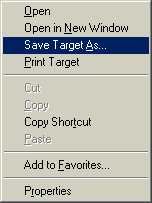
Begin your download by clicking the link for your product
using the RIGHT mouse button.
In Internet
Explorer Choose "Save Target As..." and download the file to your desktop (in Firefox you choose "Save Link As..").
Once you
select the "save target as" or "save link
as" entry,a download screen will appear
asking you where you want to save the file
to on your computer. |
The
download screen will appear similar to this...
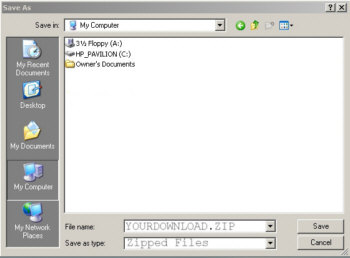
You should save the file to your "Desktop" or another folder you can easily find.
That's it. You have now downloaded your product. |
Once you have downloaded the file, go to your desktop
or where you saved the file, and double click the file to open it.
*************************************************************
Additional instructions on what to do with each file type.
| .PDF |
File names with end in .pdf are ebook files, which use Adobe Reader to open. If you already have Adobe reader installed on your computer (Most do) you can simply open the file by double clicking on the icon.
If you do NOT have Adobe Reader installed on your computer, you can download it free FROM HERE. |
| .ZIP |
A file name ending in .zip means that the files you want are inside of a zip file. Your download (ebook, audio mp3, video, etc) is actually inside of this ZIP file and you need to unzip this file to get your download out of it.
Why use zip files? Zip files are used to make the file smaller and download to your computer quicker.
Note: A single zip file may contain one or more files inside of it (for example: a collection of ebooks and video files can all be inside a single zip file)
All Windows based PC's since 2000 support extracting zip files without the need for any special 3rd party software. To unzip the file in windows, all you need to do is:
Right click on the filename.zip
Choose either Open or Explore
Select every file you see
Right click the highlighted files and select CUT
Now paste these files into the folder of your choice
(Right click, select PASTE)
If you need software to unzip a file, you can download 7Zip for free HERE and use their instructions.
If you own a MAC and need some zip software you can download YemuZip for free HERE. |
| .JPG |
File names that end in .jpg are image files (pictures) and should open simply by double clicking on the file. Please note that the image will open in whatever image software you have installed on your computer. All computers come with image viewing software . |
| .MP3 |
File names that end in .mp3 are audio files. These can be audio books, shows or music.
MP3 files can be played on portable MP3 devices such as an Ipod. (see your owners manual for instructions)
Mp3 files can also be listened to on your computer.Most computers have MP3 playing software installed already, so you should be able to play your MP3 file on your computer simply by double clicking on the file.
You can turn your MP3 file into an audio CD if you have a CD Burner (Cd Writer) on your computer. Please follow the instructions that came with your writer/burner software. |
| .AVI |
File names that end in .AVI are a windows video file. These files are played using windows media player or whatever video software you may have installed on your PC.
To play the video simply double click the file name and your computers video playing software should open automatically and play the file. |
| .SWF |
File names that end in .SWF are Adobe Flash files. These files can be animations, applets or even video files.
You can play SWF files by dragging the file into internet explorer. If internet explorer asks you for special permission, please allow it and follow any instructions it offers.
You can also play SWF files by using Flash playing software. You can learn more about this here. |
| .MOV |
File names that end in .mov are high quality movie files which are compressed using Apple Quicktime Format.
All computers (Including Windows Based PC's) can play Quicktime movies by using the free Quicktime Player which can be downloaded for free from HERE. |
| .MP4 |
File names that end in .MP4 are mpeg Movie Files.
These files can be opened in any Mpeg 4 Movie player.
My favorite MP4 player software for both PC and MAC, is VLC Media Player, which is an incredible piece of software which you can download for free from HERE. |
|
Please be sure you have read all these instructions carefully before you open a support ticket.
This will allow us to better serve you.
If you are still having difficulty with your download, you can open a support ticket HERE.
Someone will get back with you as soon as possible (usually within a single business day)
|